&w=3840&q=75)
- Point of Sale
Introducing Zeller POS: A Powerful Point-of-Sale App for Bigger Business, Without the Fees
Zeller POS is a free iPad and Android tablet app with a flat 1.2% transaction fee and no monthly subscription.
Zeller POS supports kitchen docket printing, cash drawer connectivity, and receipt printing for hospitality businesses.
Zeller POS includes variable item pricing, price overrides, and item and cart-level discounts for precise register control.
Zeller POS uses a two-mode access model to control what settings staff have access to.
Zeller POS is part of a broader financial platform including a savings account, debit cards, invoicing, and BPAY payments.
Built for businesses that need more from their point-of-sale without the fees, Zeller POS is a free point-of-sale app that runs on iOS and Android tablets and smartphones, and brings together item management, order processing, payment acceptance, and POS hardware connectivity, all in one place.
Running a busy coffee shop, café, bar, or retail store requires a point-of-sale system that can keep up. One that's fast enough for peak hour, flexible enough for your whole team to learn and use, and powerful enough to handle the complexity of a growing business. That's exactly what Zeller POS is built for.
Today, we're excited to introduce Zeller POS: a free downloadable app, available on both iOS (App Store) and Android (Google Play Store) tablets and smartphones, that gives growing businesses a capable, easy-to-use point-of-sale solution, tightly integrated with Zeller's broader payments and financial ecosystem. Here's everything you need to know.
Who is Zeller POS designed for?
If your business has multiple staff, a physical counter setup, and the need for connected hardware like receipt printers and cash drawers, Zeller POS is designed for you. It's built for café owners, coffee shop operators, bar managers, and retailers who need a powerful, cloud-based point-of-sale they can depend on every day.
If you're running a smaller or more mobile operation, Zeller POS Lite is likely all you need. It gives you the same core item management and payment functionality in a more lightweight format. It's built directly into Zeller Terminal, or is accessible via the Zeller App on your smartphone, which turns your phone into an EFTPOS machine using Tap to Pay.
Zeller POS vs. Zeller POS Lite
 Zeller POS |  Zeller POS Lite | |
|---|---|---|
| Runs on | iPad or supported Android tablet, paired with a Zeller Terminal | Zeller Terminal 1x, Zeller Terminal 2, or the Zeller App with Tap to Pay |
| Best for | Cafes, restaurants and retail counters; busier or multi-register venues | Selling on the go, pop-ups and markets, or a quick second register |
| Card payments | &w=128&q=75) via Zeller Terminal | via Zeller Terminal or Tap to Pay on Zeller App |
| Transaction fee | 1.2% | 1.4% |
| Cash payments | ||
| Items and categories | ||
| Variants and modifiers | ||
| Discounts | ||
| Service charges | ||
| Custom item grid (Favourites) | ||
| Receipts (print or send) | Printed receipts only via Zeller Terminal 1x | |
| Kitchen dockets | With a connected printer | |
| Cash drawer | ||
| Sales reporting | | |
How much does Zeller POS cost?
Zeller POS is free to download and free to run. There are no monthly subscription fees, no software licence fees, no add-on costs to unlock special features, and no lock-in contract. The same applies to Zeller POS Lite, which comes built directly into Zeller Terminal and Zeller App.
The only fee you'll pay to use Zeller POS is a flat 1.2% on every card transaction you accept, whether that's a tap, an insert, or a mobile wallet payment like Apple Pay or Google Pay. There are no separate fees for different card types, and no hidden charges for refunds or chargebacks.
To run Zeller POS, you'll need to pair it with a Zeller Terminal, and you might need some other hardware depending on the needs of your business. Here's what to budget for:
Zeller Terminal — required to accept card payments, available for a one-time purchase price of $199
iPad or Android tablet — if you're running Zeller POS, you'll need a compatible tablet. Zeller POS works on any modern iPad or Android tablet, so if you already own one, there's nothing extra to buy.
Receipt printer — optional, but recommended for hospitality businesses that need to print customer receipts or kitchen dockets. Zeller POS supports any LAN-connected ESC-P compliant printer, including popular models like the Star Micronics TSP143III and Epson TM-m30.
Cash drawer — optional, and only relevant if you're accepting cash. A cash drawer connects to your receipt printer via a cable, so no additional connectivity is required.
For a typical café or retail setup, your upfront costs are a Zeller Terminal, an iPad or Tablet, and a receipt printer, all of which are one-time purchases you own outright. After that, you're paying 1.2% per transaction and nothing else.
How Zeller POS works at the counter
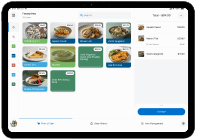
The Zeller POS homescreen is built for speed. A category sidebar and product grid let team members browse and filter your item library quickly, while a persistent cart sits alongside the product view so orders can be built and reviewed without bouncing between screens. Search works across product names, categories, SKUs, and barcodes, so finding items is fast even with a large catalogue. The app works across tablet landscape and portrait layouts, adapting to whatever setup suits your counter.
Managing pricing and discounts at the register
Zeller POS gives merchants precise control over pricing at the register, with two features that address common real-world scenarios.
Variable Item Pricing lets staff set a price for items with a $0.00 catalogue price — ideal for products sold by weight like deli meats, cheese, or bulk goods where the price changes with every serve, as well as donations, market-rate goods, or services priced on the spot. When enabled, a price entry modal intercepts the add-to-cart flow and requires a valid price before the item is added to the sale.
Item Price Override allows authorised staff to adjust an item's stored catalogue price directly within a sale — useful for markdowns, clearance scenarios, or pricing discrepancies. PIN authentication is required to make a change, and every override is logged for audit and reporting purposes.
Discounts can be applied at both the individual item level and across the entire cart, giving staff the flexibility to honour a deal on a single product or apply a blanket reduction to a customer's whole order.
All three features are disabled by default and can be toggled on at the site level.
Adding notes to orders and items
Need to pass special instructions to the kitchen? Want to document the reason behind a price adjustment? Zeller POS supports notes at both the item level and the sale level. Staff can attach a note to any individual line item or to the overall transaction, with up to 256 characters available. Each note can be marked as internal (visible to staff only) or customer-facing, in which case it prints on the receipt. Notes are visible consistently across the Zeller ecosystem, including Zeller Terminal, App, and Dashboard.
&w=3840&q=75)
What hardware is compatible with Zeller POS?
Zeller POS is built to work with the physical POS hardware that busy venues depend on.
Customer receipt and kitchen order printing is supported for any LAN-connected ESC-P compliant printer on the same network, including popular models like the Star Micronics TSP143III and Epson TM-m30. Printing can be configured to trigger automatically at the point of sale or on demand, with separate configurations for customer receipts, kitchen dockets, and customer order slips. A reprint capability covers open and recently closed orders.
Cash drawer support works through the connected POS printer via a RJ12 cable (telephone cable), with no direct connection required between the tablet and the drawer. A dedicated settings screen lets merchants verify connectivity, run a test open, and toggle auto-open on cash sales and refunds. If a drawer fails to open mid-transaction, an inline banner directs staff to open it manually with the key, without affecting the completed sale record.
Processing refunds with Zeller POS
Full refunds can be initiated directly from the POS sales record, covering both card and cash payment types. The original sale status updates in real time, and all refund activity is recorded against the original transaction with method, amount, and timestamp, giving you a clean audit trail without any extra admin.
How to manage staff access on Zeller POS
Zeller POS uses a two-mode access model to keep things running smoothly when multiple staff are involved. A manager logs in with their Zeller credentials and operates in a manager mode, with full access to settings and configuration. When they step away from the register, they can switch to General Access, a mode that keeps the device available for staff to take orders and process sales, without exposing manager-level controls. The mode persists across app restarts and device reboots, and the manager doesn't need to re-enter their credentials to step back up. General Access can also be configured to require a Site PIN before a sale can be initiated, giving managers an extra layer of control in environments where it's needed.
How to get set up with Zeller POS
Zeller POS is available to download for free from the Apple App and Google Play stores. Once installed, a step-by-step setup flow walks you through everything you need before your first transaction: signing in with your Zeller Account credentials, selecting your business entity, naming your device, assigning it to a site, configuring your site settings — including GST, tipping, and receipts — and pairing your Zeller Terminal. The whole process is designed to be completed once, so your device is fully configured and ready to trade before a single order is placed.
If you're already using another POS system, switching to Zeller is straightforward. Simply export your item library from your existing provider as a CSV file and import it directly into your Zeller Account — your entire product catalogue, variants, and pricing will be ready to go without any manual data entry.
Part of the Zeller ecosystem
Like all Zeller products, Zeller POS is integrated directly into the Zeller ecosystem — and that ecosystem goes well beyond just taking payments. Sales, refunds, and item-level notes are visible across Zeller Terminal, the Zeller App, and your Zeller Dashboard in real time, so your data is always in one place whether you're at the counter or reviewing performance at the end of the day.
But Zeller is also a business financial platform. Alongside your POS and payments, you can access real-time sales analytics to track revenue as it happens, create and send online invoices, manage BPAY bill payments, and open a high-interest savings account to put your funds to work. Instant debit cards and corporate cards can be issued to staff for business expenses, with spending limits and controls managed directly from the app.
For business owners who want to consolidate their payments, banking, and point-of-sale under one roof — rather than juggling multiple providers and logins — Zeller is built to do exactly that.
&w=3840&q=75)
Pay only 1.2% for POS and payments with Zeller.
Pay less when you accept integrated payments with Zeller POS and Zeller Terminal.
&w=3840&q=75)
&w=3840&q=75)
&w=3840&q=75)
&w=3840&q=75)